

You can usually safely delete a user but you should proceed with cautions and watch the prompts.
Navigate to user Index

Navigate to the Users > All Users menu and locate the user you wish to delete.
Access User Quick Edit menu

Hover over the user’s name – a small menu will appear beneath the user’s name – click ‘Delete’
Decide how to handle their content
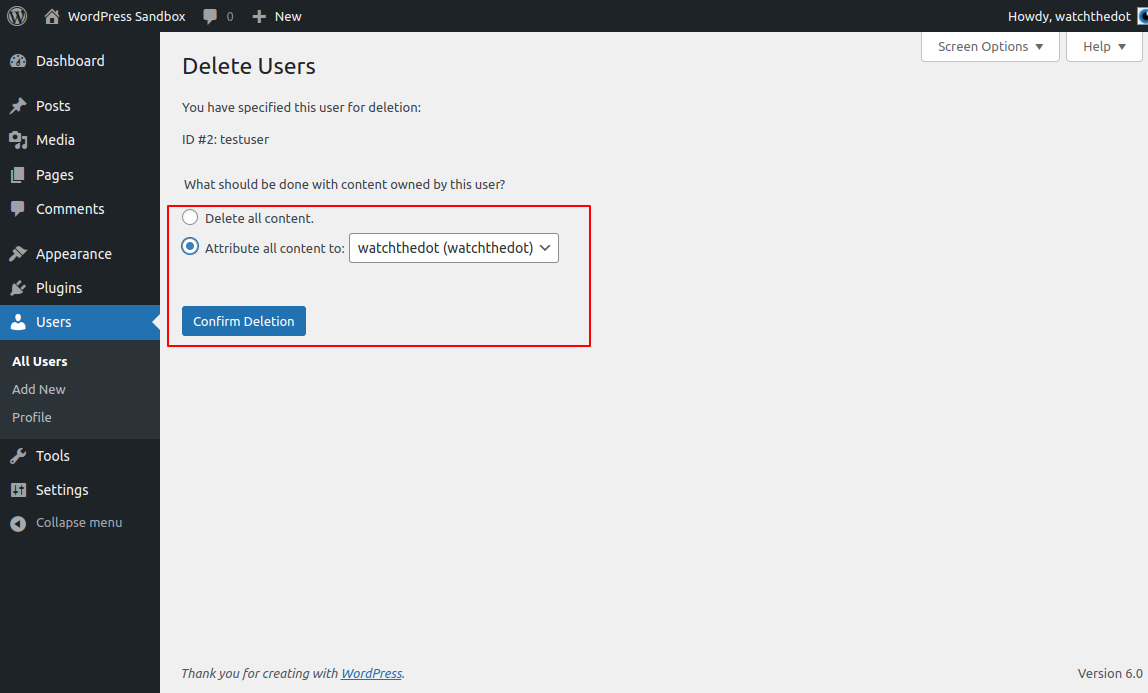
This bit’s the important bit: decide what you want to do with their content:
- Delete the content. Not a good idea if this was your web developer as you may delete all the pages on your website!
- Assign to another user.
Confirm the deletion by clicking the Confirm button.
What if you accidentally deleted all the content?
Potentially not a disaster – the content will be in the Bin / Trash. You can navigate to the bin and you should be able to restore most of the content. This can be a little messy though so we advise taking a backup of your database first.
Stop a user logging in and making changes
To prevent a user making changes and accessing important parts of your dashboard, you can just edit their account and change their role to Subscriber